

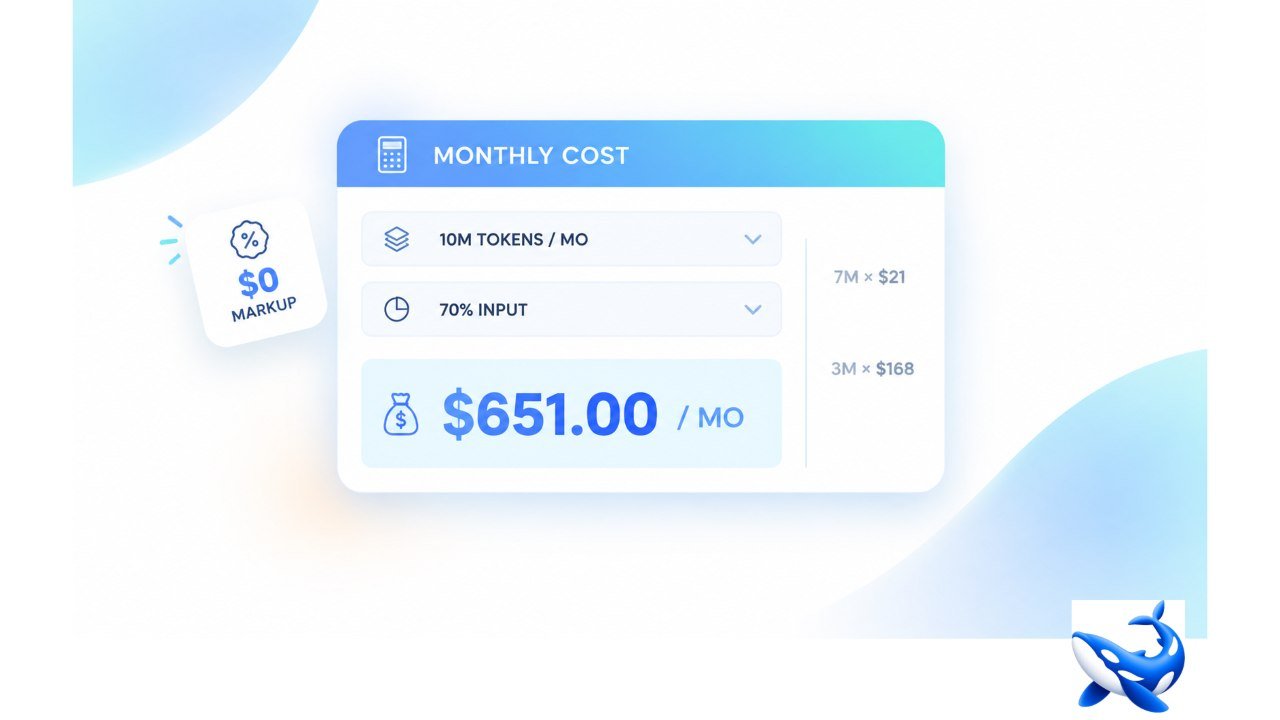
Ten million tokens a month at a 70% input split is 7 million input tokens and 3 million output tokens, and on GPT-5.2 Pro that comes to $651 a month — 7 million times $21.00 per million input plus 3 million times $168.00 per million output. OrcaRouter prints that multiplication as a working cost calculator on its OpenAI Models page, and the page says what the result means in the same block: the estimate uses the provider’s published rates, and OrcaRouter adds $0 markup, so this is what you would pay calling OpenAI directly.
A rate table is a list of prices; a cost calculator turns one of those prices into a monthly bill against a workload. The difference matters on this catalogue because its input column spans three orders of magnitude, from $30.00 per million at the top down to $0.020 for the cheapest row, and at that spread the workload — not the model name — decides the monthly bill.
What the calculator assumes?
The calculator ships with a preset shape: 10 million tokens a month, 70% input, 30% output. Run GPT-5.2 Pro through it and every step is printed: 7 × $21.00 = $147.00 on the input side, 3 × $168.00 = $504.00 on the output side, $651.00 a month in total. The model named in the estimate is not the dearest row — GPT-5.2 Pro sits at $21.00 per million input against $30.00 on the two top Pro rows — which is part of why the page picked it as the worked example: it is an expensive working model, not the extreme of the table [VENDOR].
The caveat under the estimate is the part worth quoting: the numbers use the provider’s published rates, and OrcaRouter adds $0 markup, so the figure is what you would pay calling OpenAI directly. That sentence is doing two jobs. It states that the calculator is not running a discount through the arithmetic, and it states that the rate card is the provider’s own — the input cell you read is the input price the provider charges, with nothing added on the way through [VENDOR].
The preset serves as a starting guide rather than a final judgment. Ten million tokens a month is a real production shape and it is not your shape; the point of a preset is to show the multiplication once, legibly, so that changing the volume and the mix later is a one-line edit rather than a leap of faith.
The arithmetic at the same volume
The whole point of a calculator is that it runs every row through the same shape, so the comparison stays honest. Put the same 10 million tokens at the same 70/30 split through a handful of rows and the monthly bills line up like this:
- GPT-5.5 Pro at $30.00 / $180.00 — $210.00 plus $540.00 = $750.00 a month.
- GPT-5.2 Pro at $21.00 / $168.00 — $147.00 plus $504.00 = $651.00 a month.
- GPT-6 Astra at $10.00 / $50.00 — $70.00 plus $150.00 = $220.00 a month.
- GPT-6 Sol costs $2.00 / $10.00, bringing the monthly total to $44.00, including $14.00 plus an additional $30.00.
- GPT-6 Luna at $0.100 / $0.500 — $0.70 plus $1.50 = $2.20 a month.
The same workload costs $750.00 on one row and $2.20 on another, roughly 340 times as much, inside a single 23-model table [VENDOR]. The arithmetic is why the calculator exists: at a spread this wide, the model choice and the monthly bill are the same decision, and seeing five monthly totals side by side makes that decision concrete in a way a per-token column never does.
Notice that the output column does not reorder the list. The cheapest row to feed is also the cheapest row to write, on the OpenAI table as on most pages here — the input and output columns descend in the same order, so a price-sensitive reader only has to read one of them.
Read the 23 rows top to bottom
The calculator computes on the same table it displays, and the table is worth reading in full once. It opens with GPT-5.5 Pro at $30.00 per million input and $180.00 per million output, quality 10, and closes with GPT-5.1-Codex-Mini at $0.250 and $2.00, quality 6 — twenty-three rows from the dearest pair to the cheapest code row.
| Model | Input / M | Output / M | Context (table column) | Quality (our composite, 0–10) |
| GPT-5.5 Pro | $30.00 | $180.00 | — | 10 |
| GPT-5.4 Pro | $30.00 | $180.00 | 1M | 10 |
| GPT-5.2 Pro | $21.00 | $168.00 | 400K | 10 |
| GPT-5.5 | $5.00 | $30.00 | — | 10 |
| GPT-6 Astra | $10.00 | $50.00 | 1M | 9 |
| GPT-6 Sol | $2.00 | $10.00 | 1M | 9 |
| GPT-5.4 Mini | $0.750 | $4.50 | 400K | 8 |
| GPT-6 Luna | $0.100 | $0.500 | 1M | 8 |
| GPT-5 Mini | $0.250 | $2.00 | 400K | 7 |
| GPT-5.1-Codex-Mini | $0.250 | $2.00 | 400K | 6 |
Rates are the provider’s published per-million-token figures as printed on the page [VENDOR]. The quality column is a 0-to-10 composite we build ourselves from the dimensions we grade each model on — it is our own measure, not a third-party benchmark score, and we label it that way wherever the number appears [OURS].
Two patterns survive the edit down to ten rows. First, the context column splits the table into a 1M band and a 400K band, with the two Pro rows printing no context at all — and the 400K band is where the budget rows mostly live, so a long-context workload is paying a tax to escape it. Second, the quality digit is coarse: it places a row in a tier, it does not adjudicate between two rows sitting on the same digit, which is why the table is a filter and a model page is the contract.
What the calculator leaves to you?
The calculator answers one question — what a token volume costs on a row — and it is honest about the ones it does not answer.
It does not filter by capability. The page counts the catalogue by capability separately — vision on 59 rows, audio on 7, tool calling on 62, reasoning on 37 and JSON mode on 68 [OURS] — and those counts are the right first filter, because a $2.20 bill is meaningless on a row that cannot do the job. Run the capability cut first, then the calculator on the survivors.
It does not decide your context register. The table prints 1M in its context column; the page’s FAQ answers the same question in spoken prose — GPT-6 Sol, at 1050K tokens. Both are true and they are not the same figure, so quote the register you are reading and never splice the two into one sentence.
It does not replace the model page. Across the catalogue [OURS], the page’s header achieves a median p50 of 1600 ms, while each model page tracks its own time-to-first-token using production requests. Because we quote the model pages in seconds rather than milliseconds, they represent two different measurements on different scales—so you must not read them as a single number.
The model page behind one row
The calculator can tell you what GPT-6 Sol costs at your volume, and the model page tells you what you are buying. GPT-6 Sol’s page prices it at $2.00 per million input tokens and $10.00 per million output [VENDOR], prints its context as roughly 1.05 million tokens with 128K of output [VENDOR], and notes that the rate steps up above 272K input tokens in a single request [VENDOR] — a tier inside the table row, invisible until you open the page. Its own telemetry block quotes a p50 time-to-first-token of 2.71 seconds, which is 2710 ms on the catalogue’s scale [OURS].
The takeaway
A cost calculator does not remove arithmetic; it keeps it visible. The OpenAI page runs 10 million tokens a month at a 70% input split through its own rate table, returns $651 a month on GPT-5.2 Pro, and states that the figure is what the provider charges directly because the markup is $0. Run the same shape through the rest of the 23 rows and the bill runs from $750 down to $2.20 — which is the entire argument for computing before you commit. Filter by capability, keep one context register per sentence, and treat the calculator as the first pass and the model page as the contract. For more informative articles, visit our site daily.